Copy as DNG – canon and nikon have a different ending when we shoot in RAW. If we want to combine photos from different types of camera we use "copy as DNG"
Copy – your images will be in lightroom but you will have a copy depending in which folder you will save them.
Move –your images will move from source directory to a specified location in original file format.
Add - files will not copied or moved to a new location, instead LR will just move them to the catalog you are using.
Wednesday, January 29, 2014

Light Basics and Vocabulary
Butterfly (or Paramount) --
Rembrandt --
Split --
Broad and Short --
- 1. What effect does it create? Makes a shadow under the nose and neck.
- 2. Why use it? To make variety of faces.
- 3. How many lights or light sources? 3
Loop --
- 1. What effect does it create? Illuminate only half of the face.
- 2. Why use it? It can narrow a wide face or nose. It can be used to with a weak fill to hide facial irregularities.
- 3. How many lights or light sources? 3
- 1. What effect does it create?This lighting creates a small triangle on the right side of the face.
- 2. Why use it?It gives a classic look that highlights one side of the face.
- 3. How many lights or light sources? 3
Split --
- 1. What effect does it create?it creates a strong dark side and lite side to the face, where the line runs right down the middle of the face.
- 2. Why use it?to create a dramatic and interesting photo
- 3. How many lights or light sources? 3
Broad and Short --
- 1. What effect does it create?
- 2. Why use it?
- 3. How many lights or light sources? 3
Part 2
Define
Define
Fill light-A light that is used to lighten shadow, it doesn't change the main lighting just slightly brightens.
Key light (main light)- The main light source when taking studio photos
Hair light- A light that is aimed at the hair, it helps separate the person from the background and adds highlights.
Background light- a light that helps illuminate the background of the set, and like the hair light, it help separate the background from the subject.
separate the background from the subject.
Shadowless- the whole subject is illuminated and there are no shadows visible
Hard light- is when the light is small compared to the subject.
Soft light- is when the light is bigger compared to the subject.
Grey card- helps produce a consistent light and exposure in photographs
Reflector- reflects light in a direction where the studio lights cannot be moved to.
Diffuser- Helps soften lights and not make the photo look so harsh.
Part 3
Five Characteristics of Light
Direction: See where you at and think from where are you getting the light or you will get it.
Intensity: Make like a hypothesis of how strong the light wouldl be depending the light you are using or are in the place you are.
Color: what is the color you are using.
Contrast:does the highlights help you with your picture.. are they soft or strong?
Hardness: what kind of shadows are appearing with the light you have
Direction: See where you at and think from where are you getting the light or you will get it.
Intensity: Make like a hypothesis of how strong the light wouldl be depending the light you are using or are in the place you are.
Color: what is the color you are using.
Contrast:does the highlights help you with your picture.. are they soft or strong?
Hardness: what kind of shadows are appearing with the light you have
Virtual Copies and Snapshots


1. How many photos can you export at a time using Snapshots? 1
2. Which Snapshop will get exported if you export a whole set of images
containing all of your Snapshots for the same basic image?the only image that will be exported is whichever Snapshot was applied last
3. How do you make a Virtual Copy of an image?To create a Virtual Copy of an image, simply press [Ctrl + ’]. (That is, the CTRL key on a PC, or the CMD key on a Mac, plus the apostrophe or quotation key.) Then, once you’ve created one or two virtual copies, you can edit them however you like and export all of those copies as separate images.
4. What is the advantage of using Virtual Copies instead of Snapshots? if we create three separate Virtual Copies instead, and apply the different edits to those three images, then all 3 versions will be exported. With the snapshot you just can export the last one.
Monday, January 13, 2014
Flash Facts and Skills
Flash fact #1: Every flash photograph is two exposures in one
Flash fact #2*: Flash exposure is not affected by shutter speed.
Flash fact #3: Flash illumination is dramatically affected by distance.
Flash fact #4: Your camera measures ambient light and flash illumination separately.
Flash fact #5: With automatic flash metering, the flash illumination is measured after the shutter button is pressed, and the flash output is adjusted accordingly.
Flash fact #6*: Every SLR camera with a mechanical shutter has a maximum flash sync shutter speed
Flash fact #7*:If you set your shutter speed faster than flash sync, or use Av mode with an aperture setting that requires a shutter speed faster than flash sync for proper exposure, the camera will automatically revert to flash sync speed when the shot is taken if a built-in or hotshoe-mounted flash is turned on.
Prompt 1:
Finish this sentence: The further your subject, the more powerful flash you need
Prompt 2:
Will your exposure be brighter from the light produced by the flash, if you use a slower (longer) shutter speed? What type of light will a longer shutter speed increase in any type of exposure?
It will increase ambient light
Prompt 3:
What is the primary limitation of flash?
distance
Prompt 4:
What is the maximum sync speed of most DSLR cameras?
1/200th
Prompt 5:
What is a Guide Number on a flash?
a way of quantifying its maximum output in terms that a photographer can relate to
Prompt 6:
What is the problem with using a flash pointing directly at a subject? How can a photographer address this problem?
You can soften the light from the flash by bouncing it
Prompt 7:
What is the advantage of getting a flash off of the top of a camera?
rotating it
Flash fact #2*: Flash exposure is not affected by shutter speed.
Flash fact #3: Flash illumination is dramatically affected by distance.
Flash fact #4: Your camera measures ambient light and flash illumination separately.
Flash fact #5: With automatic flash metering, the flash illumination is measured after the shutter button is pressed, and the flash output is adjusted accordingly.
Flash fact #6*: Every SLR camera with a mechanical shutter has a maximum flash sync shutter speed
Flash fact #7*:If you set your shutter speed faster than flash sync, or use Av mode with an aperture setting that requires a shutter speed faster than flash sync for proper exposure, the camera will automatically revert to flash sync speed when the shot is taken if a built-in or hotshoe-mounted flash is turned on.
Prompt 1:
Finish this sentence: The further your subject, the more powerful flash you need
Prompt 2:
Will your exposure be brighter from the light produced by the flash, if you use a slower (longer) shutter speed? What type of light will a longer shutter speed increase in any type of exposure?
It will increase ambient light
Prompt 3:
What is the primary limitation of flash?
distance
Prompt 4:
What is the maximum sync speed of most DSLR cameras?
1/200th
Prompt 5:
What is a Guide Number on a flash?
a way of quantifying its maximum output in terms that a photographer can relate to
Prompt 6:
What is the problem with using a flash pointing directly at a subject? How can a photographer address this problem?
You can soften the light from the flash by bouncing it
Prompt 7:
What is the advantage of getting a flash off of the top of a camera?
rotating it
Thursday, January 9, 2014
Tutorial from 2013
1. Name of Tutorial?
2. Save and post an example of the type of product this tutorial produces.
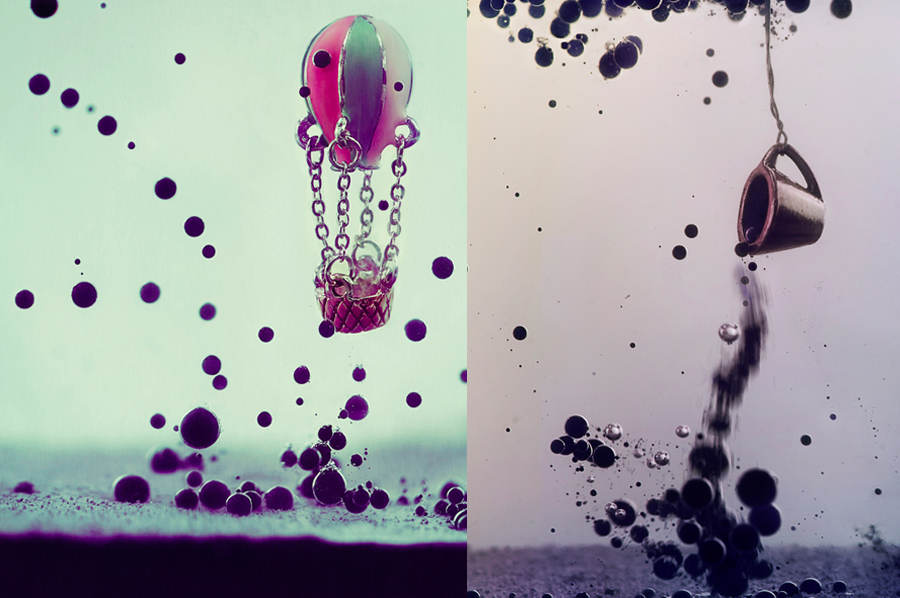
3. What equipment do you need?
Transparent container (preferably the one with straight walls, like an oblong vase or a small fish bowl)
Syringe
Sunflower/canola oil (at least 500 ml)
Water and ink (you may take any kind of it)
Chopsticks (to hang or move an object without spoiling your fingers in oil)
Napkins (the more the better)
Object or objects that will be the main subject of the picture (toys, miniatures, paper figures)
Post-processing program of choice
Macro lens
4. List of important things to do to prepare for shoot?
Have soft light, mini objects
5. List of important tips during shoot
use different colors of ink, make like spirals with the ink to have a more original photo.
6. List of important tips on how to process in Lightroom (or other software) after shoot?
First of all, we need to get rid of the yellow color from the sunflower oil. In your RAW-converter (I use Adobe Lightroom) there should be an option to decrease the saturation of separate colors. Reduce saturation of yellow and increase its luminance.
After this initial and very important edit you can proceed to editing ink bubbles conversion you may add or delete bubbles. Then adjust the color once again and voilà, the picture is ready!
Magic of Oil and Ink
2. Save and post an example of the type of product this tutorial produces.
3. What equipment do you need?
4. List of important things to do to prepare for shoot?
Have soft light, mini objects
5. List of important tips during shoot
use different colors of ink, make like spirals with the ink to have a more original photo.
6. List of important tips on how to process in Lightroom (or other software) after shoot?
First of all, we need to get rid of the yellow color from the sunflower oil. In your RAW-converter (I use Adobe Lightroom) there should be an option to decrease the saturation of separate colors. Reduce saturation of yellow and increase its luminance.
After this initial and very important edit you can proceed to editing ink bubbles conversion you may add or delete bubbles. Then adjust the color once again and voilà, the picture is ready!
Year in Photos: 2013
 |
|

-
- animal
- viewpoint, lines
- Light source or light sources? Day Light
- Natural/Artificial/Mix? Natural
- How did photographer enhance photo through use of light? he went to a position to get the lion's face with the perfect colors.
- risk his life I think hahaha maybe he went to the zoo and take a really cute picture of the lion.

- urban
- lines, pattern
- Light source or light sources?bright light, spotlight
- Natural/Artificial/Mix? Artificial
- How did photographer enhance photo through use of light? he kind of did a silhoette with shadows. He was in a position against the light.
- I think he didnt do a lot of work, he just waited to have a perfect moment to shoot.

- landscape
- balancing, background
- Light source or light sources? from the stars, from the sky
- Natural/Artificial/Mix? Natural
- How did photographer enhance photo through use of light? maybe use an ISO higj to have a bright color or took the photo in one exact time.
- measure the distance

- Urban, photojournalism
- Leading Lines, viewpoint
- Light source or light sources? Sun light, daylight, firelight
- Natural/Artificial/Mix? natural
- How did photographer enhance photo through use of light? makes a different type of lightning, by the way he took it. It take the attention of the viewers.
- Random snap, maybe in a fight.
Subscribe to:
Posts (Atom)